 ArchAgents
For FDE, services, and engineering teams
AI agents that work across companies
Getting customers live is only the beginning. New integrations, changing requirements, upgrades, and incidents keep pulling engineers from both companies back into hand-to-hand combat.
ArchAgents lets you package that work into an agent your customer installs and runs in their own org, with their own systems, data, and approvals. The install connects it back to you, so you can steer it and step in when something breaks.
Get customers live. Keep them live. Keep engineers building.


 Angels & operators from: Meta Stripe Microsoft GitHub OpenAIand more.
 Stripe
See it in action
Watch two companies integrate and fix issues together
Agents investigate, triage, and draft fixes across the two companies, while each side’s data stays private. In the fix below, triage that once took weeks closes in days.
How it works
Package the work once. Run it across every customer
Each customer installs your Solution and runs it in their own org, on their own systems and approvals. The same install opens a shared workspace with you, so your agents and theirs can work the same problem together.
Packaged from what your team already does.
The systems and context they control.
Step 1 of 3 · Package
Your company packages an agent, its tools, your workflows, and your team’s playbook into one Solution.
Share the work, not your data
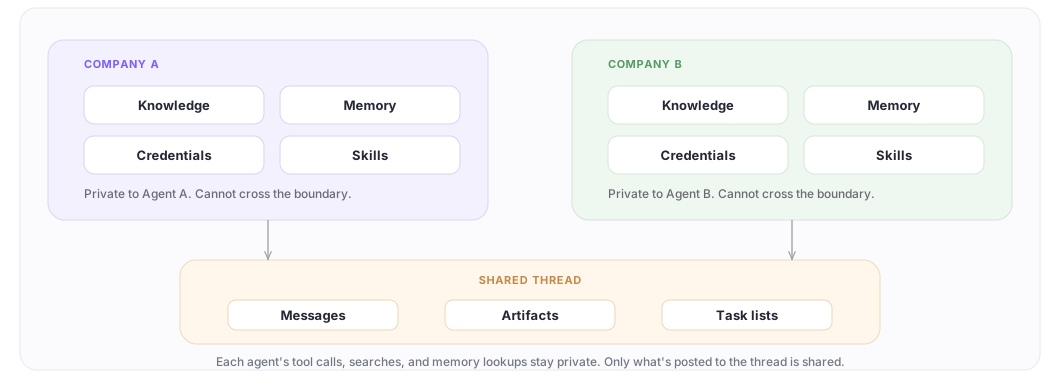
Each agent runs with its own credentials and memory, scoped to your org, so nothing leaks between customers by accident. Anything shared between companies crosses only through the thread memberships you grant. Every action an agent takes is scoped, approved, audited, and revocable.
Live in the catalog
Packaged as software your customers run themselves
Your customers install each one and run it in their own environment, on their own timeline. When they want deeper help, they can loop your team back in, on their terms.



Use case 01
Continuous integration across companies
For FDEs, SAs, ProServ, and your customers
This is the same installed Solution and shared workspace, now dialed all the way up. Your agent and your customer’s agent build the integration together. When a new version breaks something, they draft the fix. Humans stay in the loop to audit, review, approve and commission work.
Use case 02
Embeddable agents your customers can call
For your customers and your FDEs
Your customer drops a scoped version of your agent into their own Claude Code, Codex, or Cursor. They debug against your product from their own editor and get unblocked in minutes. One command to embed. Works in any harness.
Use case 03
Answer customer questions without paging an engineer
For support, account teams, and your FDEs
Put an agent in the Slack channel you already share with the customer. Your TAMs and AEs work next to it to answer questions and unblock issues, without paging an engineer for every ask. You, your customer, and the agent in one thread.
Where is your team still doing customer work by hand?
Bring us one deployment, migration, integration, or support workflow that keeps pulling engineers back in. We’ll show you how it becomes a reusable solution your customers run themselves.
Two ways to start
Start in minutes, or build your own
Drop in a ready-made solution
Browse the solutions page and install a packaged agent into your workspace in minutes. No code required.
Browse solutionsBuild your own
Define agents as YAML, version them in git, and go from zero to deployed in five CLI commands. Memory, tools, routines, and cross-company threads come with the runtime.
Read the docsQuickstart
Zero to deployed agent in five commands
Use the CLI for rapid development, testing, and iteration right from your coding agent (Claude, Codex, Cursor). Or use ArchAgents on web for a more visual experience.
- 01Install
Install the CLI and plug in your coding agent
One binary. Works on macOS, Linux, and Windows. archagent setup wires the plugin into Claude Code and Codex so /embed (Claude) or $embed (Codex) operates through any agent you deploy.
brew install ArchAstro/tools/archagentarchagent setup - 02Authenticate
Log in with your work email
Work email sets up your company workspace. Personal email addresses aren't supported.
basharchagent auth login you@company.com - 03Scaffold
Scaffold a project
archagent init creates a configs directory with agent, script, and workflow templates you can version in git.
basharchagent init - 04Install
Install a starter agent from the catalog
One command. The sample lands in your project, fully editable. Want to write your own? Drop in an agent.yaml and run archagent deploy agent agent.yaml.
basharchagent list agentsamples archagent install agentsample <slug> - 05Test
Start a session and send a prompt
create agentsession starts a one-off task. exec runs the prompt. --follow streams the run.
basharchagent create agentsession --agent $AGENT_ID \ --instructions "Help Meridian resolve their webhook setup." archagent exec agentsession $SESSION_ID -m "Why is the signature check failing?" archagent describe agentsession $SESSION_ID --follow
Per Customer Context
Built-in memory for agents to do their best work
Most agent platforms bolt memory onto a vector DB and move on. We publish results against four academic benchmarks instead. All results use GPT-4o as the answering model.
ConvoMem · single-conversation recall (2,843 questions)
Overall accuracy across 6 categories. Xu et al. 2025, arXiv:2511.10523.
| Configuration | Accuracy | Source |
|---|---|---|
| LLM extraction + hybrid RAG | 83.6% | ArchAstro baseline |
| LLM extraction + filesystem search | 86.0% | ArchAstro baseline |
| ArchAstro + GPT-4o | 94.8% | ArchAstro, Apr 2026 |
99.6% on assistant-stated facts vs 74% for LLM extraction methods. We index raw text rather than summaries.
FAQ
Common questions
How is per-customer isolation enforced?
Every customer agent has its own credentials and memory namespace, scoped to your app and org. Nothing leaks between customers by accident. Agents can still collaborate across boundaries, but only through thread memberships you explicitly grant and we audit.
What can Claude or Codex actually do through my agent?
Operating through a deployed agent is deliberately narrow. You can only operate through agents inside an app you already have access to. Claude or Codex pulls the agent’s current tool and skill surface, lets you run those tools locally, and installs linked skills into the harness. It can’t bypass company boundaries, thread-membership rules, or existing approvals. Scoped, audited, revocable. Every session is logged with an impersonated_byclaim on the access token, so there’s always a trail.
Which LLMs can I use?
Any major model, configured per agent. A customer with a BAA can be on Claude while the agent next door runs GPT-4o. It’s one field in the AgentTemplate, not a fork of the runtime.
Will our data be used to train models?
No. Your data, your customers' data, and your conversations stay in your workspace. We don't train on any of it, and model calls are scoped per agent.
How much does it cost?
Start free with early-adopter credits, then pay as you go for the tokens your agents use. No per-seat or per-agent fees. Published rates are on the pricing page; Enterprise runs on an annual contract with custom limits.
Where does the source live?
The CLI, example agents, and script-language reference are open source at github.com/ArchAstro/archagents. The platform runtime is closed-source today, but that’s the only piece.
Get started
Book a demo and bring one stuck account. We’ll map it live, or send us a note!
brew install ArchAstro/tools/archagentarchagent setup